shape.md
c130 Phase 2: the shape of the native app
What this is. A proposal, not a spec. It says what the native app (name: c0) is: its pages, its two states, its one data switch, how it reaches a control plane (publicly Qplane today; name: c0), how it talks with the web app, what it may cost, how it carries the brand, and what it does about qmap. It travels alone: the rulings and the open questions are carried in at the end, so a reader needs nothing else to judge it. Written: 2026-11-11, from the records as they stand that evening: the plan (D1–D10 and their rulings, the Answers, the Facts), the primer, c131's plan, synthetic data and Phase 2 plan, c137's plan, bones and ports, c136's plan, c134's Kamal prep and inventory, c138's plan, and the sketches at /cycles/design/sketches. Measured numbers are the spike's (qnative c1) and c2's; everything else is read or ruled. Reader: Mark, who accepts or amends it at gate G1. Then Tyler's requirements session (G2), where it goes beside the primer and the running app. Then whoever builds c131. Names. Three things in this document have no final name. Each is written with a working word and marked at first use: the native app (name: c0), the control plane (publicly Qplane today; name: c0), and the two roles, the overseer and the citizen (internal working words; name: c0). The words are decided in the app repo's naming cycle, c0 "Call my name", in a session with Tyler. Nothing below depends on which words win. Voice. The brand's rule for product UI and for errors and alerts holds throughout: say what happened, why it matters, what to do next. Nothing is alarming; nothing is a dashboard.
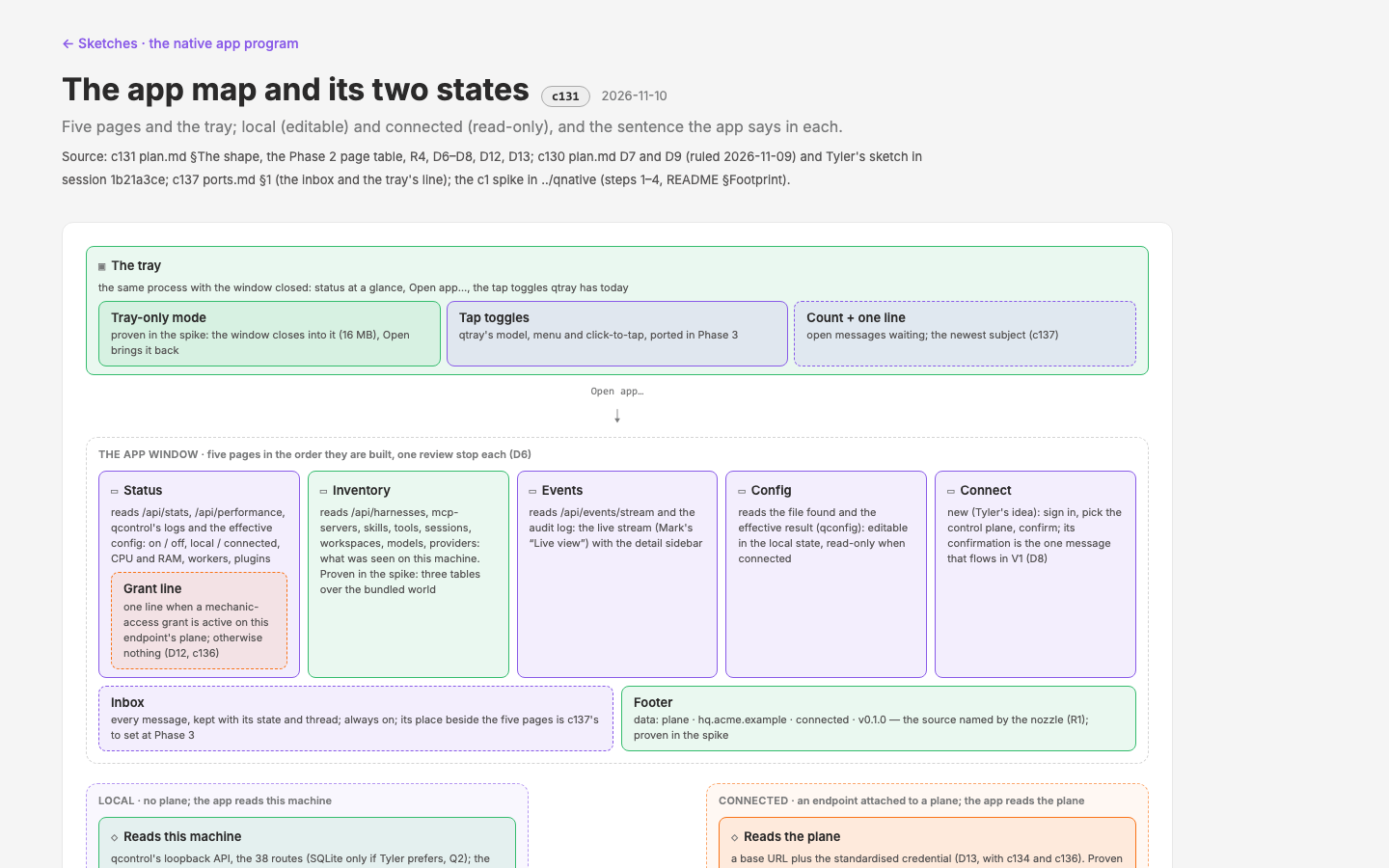 Sketch: the app map, drawn 2026-11-10 in the design system. Mark's own drawings may replace it.
1. The app map
One window, five pages, and the tray. Every page is the one-machine cut of a qdash page that exists today; the data-interface bible behind those pages becomes Rust traits (c131 R1–R8). The order below is the build order (c131 D6, as amended by c138 ruling 2).
| Page | Its qdash source | What changes in a one-machine scope | States to draw |
|---|---|---|---|
| Status | the overview, /api/stats and /api/performance, qcontrol's logs and effective config | The fleet's headline numbers become this machine's: on or off, local or connected, qcontrol's own CPU and RAM, its workers and plugins, a log tail. Six shapes the fleet never served (sensor state, resources, effective config, log line, config file, plane connection) become qdash routes typed and generated like the other 38 (c131 D17). One line for a mechanic-access grant when one is active on this endpoint's plane; otherwise nothing (c131 D12, c136). | off · starting · on-local · on-connected · degraded |
| Inventory | inventory/*: harnesses, MCP servers, skills, tools, sessions and workspaces, models and providers | The fleet bill of materials becomes what was seen on this machine. Six rules (c131 Phase 2): activity carries as is; "how many, where" becomes "here, at this path"; people and places leave the rows; drift moves inward (copies that disagree between your harnesses); the served-but-hidden long tail comes forward (binary path, fingerprint, config source, permission modes); nothing is blanked. The web's orphan, Harness install detail, is already about one machine and becomes the harness page. All seven listings and nine details exist in qnative c2 at fidelity 3 on the Meridian world cut to one host. | empty (day 0) · minimal · typical (day 90) · overflow · error |
| Events | live.vue, activity/, /api/events/stream, the audit log | The curated layer of meaning over this machine's stream: rows are activities, not frames (a turn, a tool call with its decision, a request with its latency, a finding); volume becomes a count; what matters rises; every row opens to its evidence. The raw firehose, Live, moves to developer mode (c138 ruling 2); Events stays in every build. The audit log joins it, with the message and grant events (c137 bones §9, c136 D5). The stream's cursor and replay are the sensor's to add (c134 gap 26). | idle · streaming · paused · filtered to nothing · error |
| Config | settings.vue, qconfig | The file found, as written and as it takes effect (defaults, the file, the plane: which won). Editable in the local state; read-only when connected, and the page says the plane manages it. Three sources of configuration are drawn in c138's Config page (manual, the plane, a documented starter fetched once) and that page becomes V1's with little change. Which policies and controls reach this endpoint show here, read-only, edited on the web app. | local editable · connected read-only · invalid file |
| Connect | none; Tyler's idea in the 2026-11-05 session | New. Sign in, pick the plane, confirm, connected. Its receipt is the identity confirmation, the one message type that flows in V1 (§5). Disconnect returns the app to local. Alert permission is asked here, once, with the reason (c137 D9). | not connected · signing in · connected · failed, with the status code |
| The tray | crates/qtray (macOS only today): a passive viewer over monitor inventory with click-to-tap | The same process with the window closed. Status at a glance, Open app, the tap toggles qtray has, and the message count with the one line that matters (c137 ports §1.2), hidden when nothing waits. The spike proved tray and window in one process on macOS: tray-icon created inside GPUI's run callback, events bridged by a channel (c131 D7 path B). Windows and Linux are wired and unbuilt; a stock GNOME has no tray host, so the app must run tray-less. | window open · tray-only · tray absent |
Two more surfaces sit beside the five: the inbox, every message kept with its state and thread, always on (c137; its place in the sidebar is set at c137 Phase 3), and the footer, which names the source and the world on every page ("data: synthetic · meridian-day90 · nina-mbp"; "data: plane · hq.acme.example · connected"). The footer is how the app stays honest about where a number came from (c131 R1, bible R23).
Developer mode (c138) is not part of the map. It is an extension behind a gate: absent from the lean build, off by default in the full one, with no presence at all when it is not allowed.
2. Two states of the app
The app is in one of two states, and they differ in exactly two things: what the app reads, and whether Config opens. Everything else is the same pages.
| Local | Connected | |
|---|---|---|
| Reads | this machine: qcontrol's loopback API, the config file found, the SQLite behind qcontrol if Tyler prefers it (Q3) | the plane for what the plane owns (configuration, messages, grants, the fleet's view of this endpoint); this machine for what only it sees (the live stream, qcontrol's own process figures) |
| Config | editable, behind one guard (c131 R4) | read-only; the same guard, closed |
| Shows | what was found on this machine | what was found on this machine, as the plane holds it, and that the plane manages the configuration |
| Messages | from qcontrol on this machine only: enforcement notices in local mode and sensor state; Contact IT is one-way, a mailto from qcontrol's it_contact (c137 D13) | from the plane, through the inbox, the tray and the OS, under the citizen's controls |
The sentence the app says in each, on Status and wherever the state matters:
- Local: "This machine runs on its own. The configuration lives here and you can change it. Here is what was found." (proposed here; the record gave only the connected sentence)
- Connected: "You're connected to HQ. The configuration is managed there. Here is what was found on this machine." ("HQ" is the plane's sender label, a plane-set string the customer may change to "Security" or "IT"; c137 bones §7.1)
Connect moves the app from local to connected without a relaunch, over the same re-open path that swaps synthetic worlds (c131 D16): replace the repository handle, bump a generation, every page reloads, the footer re-reads. Disconnect is the same path back. A read started in the old state that finishes late is dropped.
One rule the records left open and this document settles: "connected" is not "read everything from the plane". The plane has this machine's events only after the fact and never has qcontrol's live process figures. So the nozzle's rule for the connected state is: the plane for what the plane owns, local for what only this machine sees (c134 Kamal prep §6). Status and Events read both; Config, Connect and the inbox read the plane.
3. The data switch
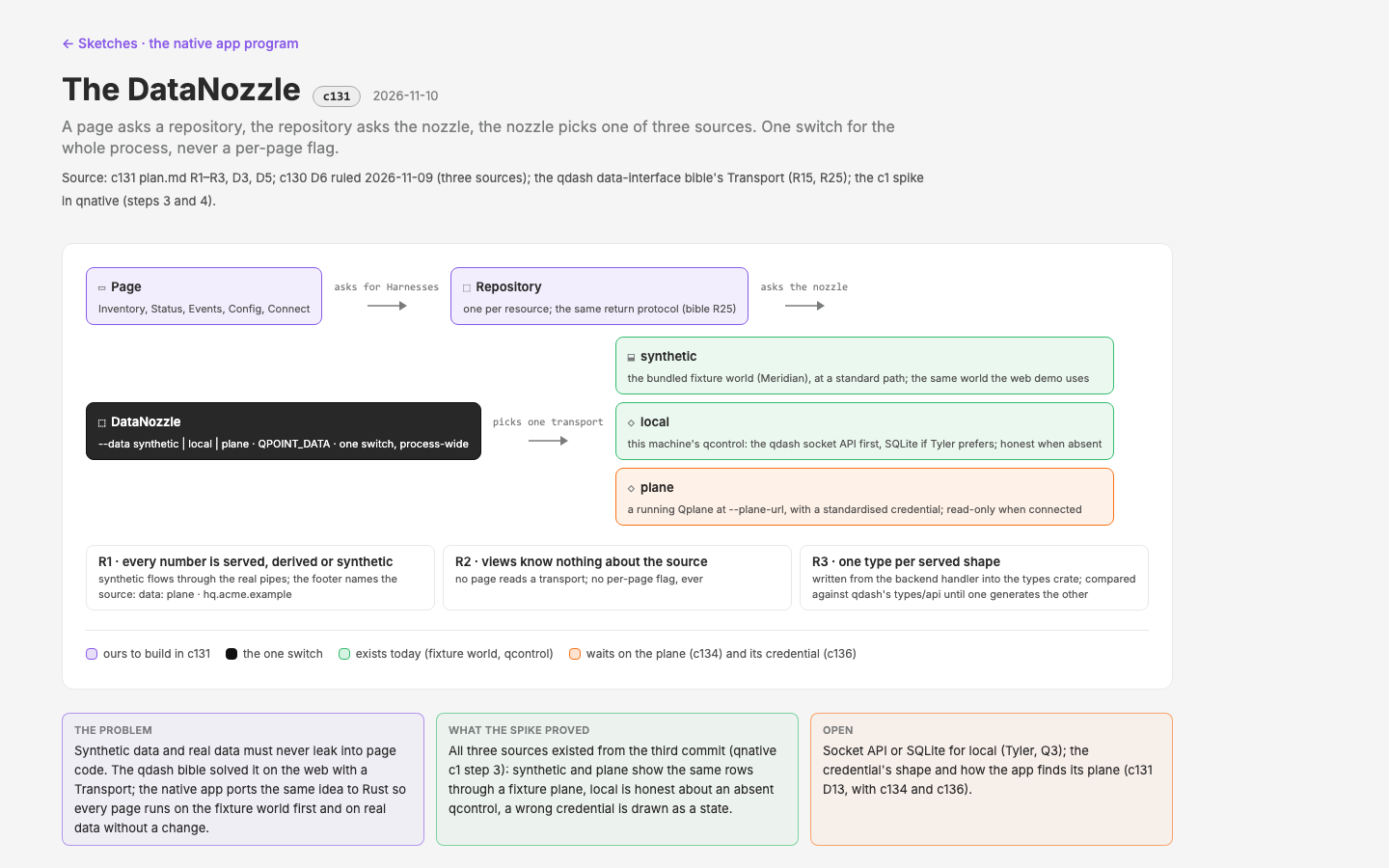 Sketch: the DataNozzle.
One switch for the whole process, never a per-page flag (c131 R2). A page asks a repository for harnesses; the repository asks the nozzle; the nozzle picks one of three sources. Views know nothing about the source. It is the qdash bible's Transport, ported (R15, R25 as Rust traits), and the spike had all three sources running from its first commit.
| Source | Reads | How it is chosen | What it proves |
|---|---|---|---|
synthetic | the bundled worlds: Meridian, the web demo's own world, cut to one machine through qdash's real ingest and handlers (c131 synthetic-data). Three are bundled today (meridian-day90, minimal, fresh); pilot and the others are named and cut by the same script. | --data synthetic or QPOINT_DATA; the default in debug builds. The world is chosen in the app's settings, shown only while the source is synthetic (c131 D16); --world and QPOINT_WORLD stay for captures. | synthetic flows through the real pipes (c131 R1): served JSON at the real routes, through the same repositories, checked against the generated types by a strict drift test. No page holds a fake. |
local | this machine's qcontrol over its loopback API, found through qdash.sock.lock; the 38 routes plus the six endpoint-only shapes as new routes (c131 D17) | the default in release builds | the app is honest when qcontrol is absent: "qcontrol's dashboard is not running on this machine", drawn, not blank (c131 R5) |
plane | a control plane at a base URL with a standardised credential (Authorization: Bearer in the spike; the real form is c131 D13 with c134) | --plane-url or QPOINT_PLANE_URL; set by Connect once it has run | the fixture plane serves the same world at the same routes with an optional token; a wrong token is drawn as a failed state with its status code |
Three amendments since the ruling, all carried here:
- The six endpoint-only shapes (SensorState, Resources, EffectiveConfig, LogLine, ConfigFile, PlaneConnection) are qdash routes (
/api/sensor,/api/config,/api/plane), typed in TypeScript beside the 38 and generated into Rust under the same drift test. Not hand-written, not qcontrol's internal structs. One mechanism for all 44 shapes; the ask to qcontrol engineering goes through c134's API document (c131 D17). - On the Sensor page in developer mode the switch has two positions, the real sensor (this machine, or an address at the near end of an SSH tunnel) or fake data. The plane is a connection, not a data choice for this machine's own data: anything the plane knows about this machine, the sensor told it. The
planetransport stays in the code for the plane-owned reads of §2 and for tests (c138 ruling 3; c130 D6 amended). - The switch can change while the app runs in developer mode, over the one re-open path of §2. Precedence: flag, then environment, then the saved choice, then the build's default.
What this asks of the plane: serve the same shapes at the same routes until one schema generates all three consumers (the web app, the native app, the Go handlers; c134 Kamal prep §4.2), and be able to import and export the Meridian world, so web and native agree by construction (§4.1 there).
4. Access and credentials
The connection credential (c131 D13). The native app holds no browser cookie. It holds one per-endpoint bearer, issued by the plane at Connect, kept in the OS keychain through GPUI's credential calls, sent as Authorization: Bearer on every plane read, revocable on the plane. The receipt is the identity confirmation message (§5). When the credential expires the same message type says "sign in again"; when the plane revokes it, "HQ disconnected this machine". The exchange's exact form (enrolment, the token's format, the heartbeat's cadence and what it carries: sensor version, health, the app's version) is the plane's half, question 5 of the Kamal prep and gap 10 of c134's inventory; the default we would accept is written there.
How an endpoint finds its plane. Three ways, each honest about what it needs:
| Way | How | Needs | When |
|---|---|---|---|
| Configuration | a plane address in qcontrol's configuration (the Qplane mode of c138's Config page) | a credential still has to be obtained through Connect | a company that deploys qcontrol with its plane already named |
| Connect | the person signs in from the Connect page: an OAuth-style sign-in in the browser with PKCE; the redirect returns to the app | a loopback redirect (RFC 8252) works in dev builds and unbundled binaries | the V1 flow |
| A deep link | qpoint://connect?… from the web app's install page, received through GPUI's on_open_urls | an installed, signed bundle on macOS; second-instance forwarding on Windows and Linux | once the app is packaged (c131 Phase 4) |
The scheme is the right destination once the app is installed; loopback is the right tool for the spike and for unbundled builds (primer, platform §8). Whether the sensor sees its own loopback OAuth traffic is a question for the spike's next pass.
Mechanic access (c136). The other direction: not an endpoint reaching a plane, but Qpoint reaching a partner's plane to fix something. A build partner grants it, time-boxed and categorised, and the native app only reads the result as one line on Status. A grant is one record on the plane:
- Four purposes: diagnose (look, change nothing), fix a documented problem, implement a feature the partner asked for, hot-fix an incident in progress.
- Three levels: observe (configuration, logs, metrics, the audit log), operate (plus restart services, run shipped migrations, change settings), change (plus deploy a build or a hot-fix; the shortest default window).
- A window: 1 hour, 1 day, 3 days, or 7 days at most; automatic expiry; revocable at any moment. A renewal is a new grant with its own record.
- Named people: the admin who granted and the Qpoint people admitted by name, never a shared account; every action under the grant carries the grant id in the audit log, and the admin gets a summary at close.
Grants are plane objects; Qpoint never self-grants and never holds standing access. The partner can watch the actions live. The grant notice to the operators is a message through c137's channel, not a second channel. The native app's whole surface for this is read-only: the Status line while a grant is active on the plane this endpoint reports to, and the access.grant.* entries in the audit log.
5. Conversant with the web app
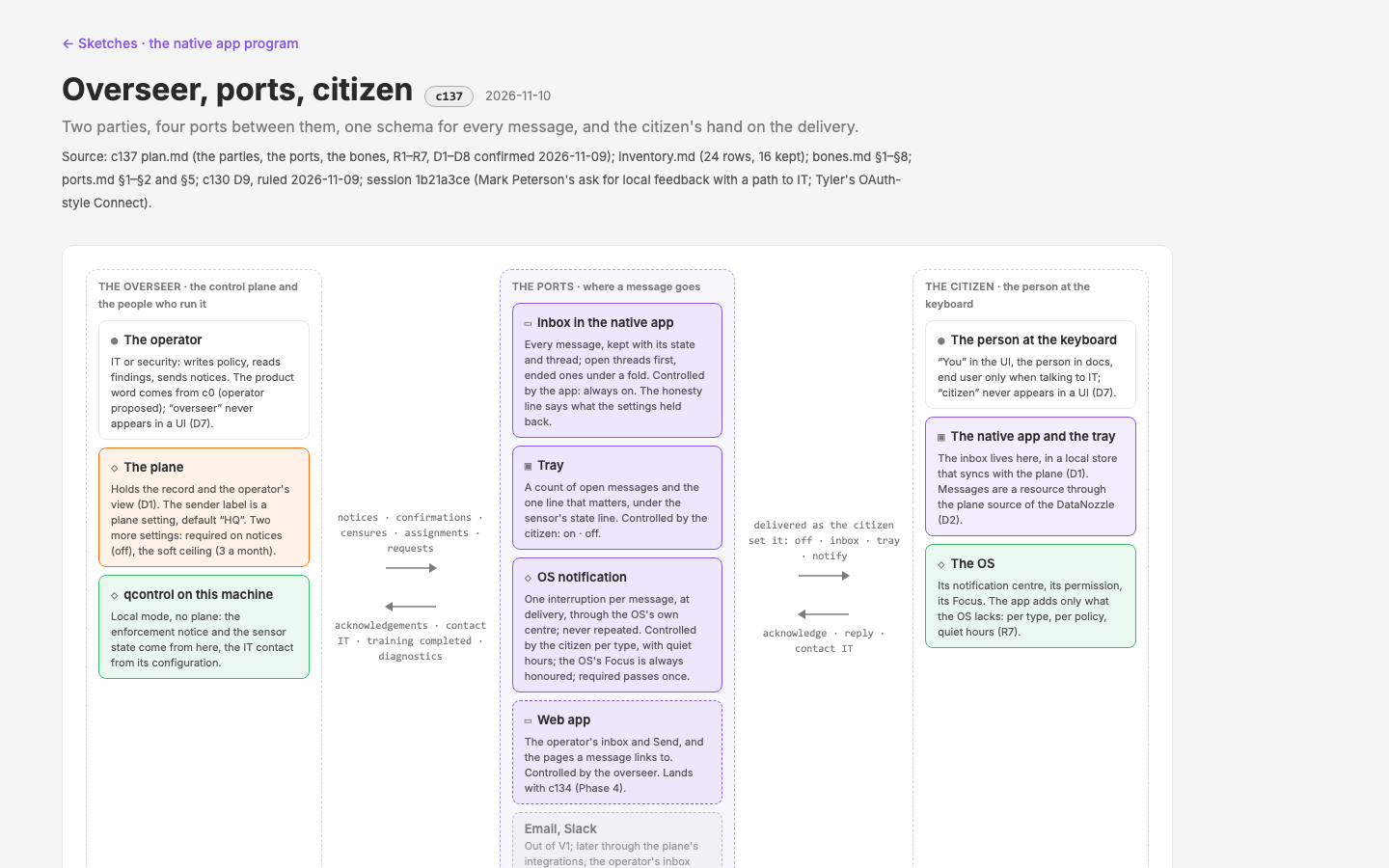 Sketch: the channel.
Two parties talk through the two apps: the overseer (the control plane and the people who run it) and the citizen (the person at the endpoint). The ports (the channels) and the bones (the skeleton of a message) are designed once and ship with V1, even though only the Connect confirmations flow at first (D9, c137). The person's control over what reaches them is the design, not a settings page added later.
The ports. The inbox in the native app (every message, kept, always on); the tray (a count and the one line that matters; the citizen's switch); the OS notification (one interruption per message at delivery; the citizen's, per kind, with quiet hours; required passes); the web app (the operator's side of the same inbox, at Admin › Messages, and the pages a message links to). Email and Slack are out of V1 for the citizen, and reach the operator's inbox first through the plane's integrations later.
The bones. One schema for every message, fifteen types, three severities (info, attention, required: never danger or critical in the citizen's UI), a subject of 60 characters, a body of three sentences (what happened, why it matters, what to do next), up to three actions, a "why am I seeing this" line fixed at send time, and five states: new, seen, acknowledged, done, expired. Every message ends; the inbox is a record, not a pile. The plane records created, delivered, acknowledged, done and expired; seen only where an acknowledgement is required; nothing about dwell or read time.
What the native app receives. Enforcement notices (a policy acted on this machine: what, why, how to reach IT), HQ notices, identity confirmations, censures (HQ's words verbatim, labelled as such, never rewritten by us), responsibilities, training assignments, requests for diagnostics, configuration changes, and, from qcontrol locally with no plane, enforcement notices in local mode and sensor state.
What it sends. Acknowledgements, Contact IT with the message's context attached, training completed, diagnostics on request (consent first, the package shown before anything leaves), and the connect request.
The three delivery modes (c137 D9, ruled 2026-11-11). Per kind, three plain modes, quiet · normal · priority, each one OS interruption level (macOS passive, active, time-sensitive; Windows toast priority and Focus Assist). Priority is the ceiling and only required messages may use it. The person may set any kind quieter, including enforcement notices to the inbox alone; tray is the default for them (c137 D13). Without the time-sensitive entitlement on macOS, required is one ordinary notification plus the tray plus the inbox flag.
The one override. required is the single thing the citizen cannot turn off: one notification even during quiet hours, must be acknowledged, never expires, counted. The sender may set it only on enforcement notices and censures; the settings page shows "HQ has sent this machine 2 required messages this month"; above a soft ceiling of three the operator writes a reason line the person sees. Honesty in both directions.
The first flowing type is the identity confirmation, the receipt of Connect (bones E4): "MBP-2291 is now connected to HQ at hq.acme.example as mark@acme.example. HQ manages this machine's configuration from there, and what qcontrol finds here is reported to it. Nothing to do; Status shows what is reported, and Connect lets you disconnect if this is not your machine." The same type carries "sign in again" and "HQ disconnected this machine". Which types flow beyond it in V1 is Tyler's at G2 (Q12).
Training assignments as messages (c133). A training is four things: a trigger, a lesson of one to three minutes, a check, and a record. It arrives as a training-assignment message with a start-training action, runs on the web app opened from the notice (inline in the native app later if the content model is small enough), and completion goes back as training-completed into the audit log as proof of correction. No channel of its own; by default a training records and does not block. Open required and new messages float above seen ones in the inbox (c137 D10); a short toast in the app's notification host confirms an action when the card moves under the fold (D12).
The first native tour exercises this slice (c131 D15): switch to the pilot world, simulate a bad event (the paste scare, the secret-file read or the incident), watch the enforcement notice arrive locally, tune what gets through.
6. The budget
The sensor's own figures, under 1% of a core and under 30 MB, are not the app's. They are the story customers are told about qcontrol, and the reason the dashboard left it. The app sits beside the sensor on the same machine, so its cost is a first-class result, measured, not promised (c131 R7), and stated in the words a client who opens the task manager will use.
Baseline, measured. strobe 0.26.0 on an M2 Max, macOS 15.6, release build, idle for 60 seconds after a 5 second settle; the recipe is in the app repo's README so any agent can repeat it.
| Reading | The spike (qnative c1, 2026-11-09 and 11-10) | After Inventory (qnative c2, 2026-11-10) |
|---|---|---|
| Private memory, window open, idle | 52–80 MB (the spread is GPU surface memory that follows the display) | 62 MB at rest |
| Private memory, tray only | 16 MB | 21 MB |
| Private memory after every page has been shown | not measured (one page) | 116 MB: GPUI's glyph and image atlases filling once, not a leak |
| CPU, idle | under 0.005% of one core; 0.3–1.2 wakes per second; no steady wake-up source | unchanged |
Startup, main to first render | 264 ms (median of three) | unchanged |
| Release binary | 17.9 MB, of which 1.8 MB is Inter | 23.2 MB |
Ruled 2026-11-11 (c131 D19): the atlases are released when the window closes to the tray, so the tray-only figure is what a machine carries all day.
Proposed targets per release, stated per OS as memory.app.private idle after 60 seconds, idle CPU and wakes per second, binary size and time to first render, never RSS alone (it differs per OS and miscounts shared and swapped pages):
| Target | V1 (G3) | Later releases |
|---|---|---|
| Tray only, idle | under 25 MB | under 20 MB |
| Window open, idle, on the default page | under 80 MB per display | under 64 MB |
| After a full walk of the pages, window open | under 128 MB; back to tray-only within a minute of closing | under 100 MB |
| CPU, idle, window or tray | under 0.01% of one core; no steady wake-up source; insights empty | the same |
| Startup to first render | under 400 ms warm | under 300 ms |
| Release binary | under 32 MB with the lean build; the full build may be larger and says so | under 32 MB |
| Nothing resident when quit | the process is gone; no helper stays | the same |
The numbers are proposed, not ruled: they are the measured baseline with room for Status, Events, Config, Connect, the inbox and the tray's port, and they are Tyler's to set at G2 (Q8). What is ruled is the method: every release records these readings per OS with strobe, the readings sit in the repo's README and on the Monitor page's own panel (c138), and a release that moves past a target says so in its notes. Developer mode is measured separately in four states (lean; full, off; full, on, nothing opened; full, Components shown) so the claim "the production build contains no developer tooling" is checked in CI rather than argued (c138 ruling 1).
What the spike could not measure: frames, which strobe refused without Screen Recording; Windows and Linux, wired and unbuilt until the repository has a remote (c138 ruling 7); the sensor's own cost per subscriber, which matters more to a sensitive client and is the Guide's page 7.
7. The brand
D5 as ruled on 2026-11-09 was subtle to non-existent: the kit's default theme with Qpoint's semantic tokens, no custom components. c2's scorecard changed it (30 of 36 components drawn on GPUI, 28 at fidelity 3, none composed from the kit; the kit carried the shell and our vocabulary was drawn), and Mark amended D5 on 2026-11-11 (c131 D18):
- Our layer, drawn on GPUI with our tokens.
crates/layerin the app repo carries the web layer's component names (DataMachine, DataRankedBars, DataTable with the expand row, UxPill, the editor frame and file tree), so the parity table reads one to one and a designer who knows the web layer knows the native one. - The kit for the shell. Window chrome, the title bar, the sidebar frame, dialogs, sheets, menus and the notification host stay the kit's, so platform conventions are earned where the kit's design guide says they are: Command and Control, the native menu bar on macOS, drawn window controls on Linux, the system's light and dark.
- Inter and Geist Mono, bundled (c131 D14, ruled 2026-11-09, noted for the degrees of expression the brand type gives). Inter 4.1's five static faces, since the variable file drew every weight as regular; 1.8 MB plus 0.3 MB in the binary; both under the SIL Open Font License with the licence text shipped.
- The token bridge (c132 D2, built in c2): the layer's
tokens.jsonand semantic roles are the source and the kit theme is generated, never hand-edited, by design'sscripts/tokens-to-kit.mjsinto a Qpoint light and dark theme that maps our 21 semantic roles onto the kit's 134, plustokens.rsfor the layer crate. Grape is the action colour, Leaf is positive only, the card keeps its radius and its two-layer shadow in light and its border in dark, dark follows the OS. - What stays subtle. The logo in the tray and the title, the accent on interactive states, the type. No illustration in the app (the brand keeps hand-drawn work for editorial contexts). The app should look like Qpoint to someone who knows the web app and like a well-made native app to someone who does not.
What GPUI gives for that: every pixel is ours on three OSes, so the same screen looks the same everywhere. What it costs: accessibility is published, not inherited. AccessKit roles and names on every drawn control and keyboard reachability per page are a check in c131's definition of done (c131 D10), and no GPUI app has a screen-reader run on record, so V1 states its accessibility stance in words (primer question 5).
8. qmap
D8, ruled conservative: V1 links to the control plane's qmap. Mark's words were that the trade-offs are not yet understood well enough to rank and that "we can't spike usage". The primer costed the four approaches (comparison, "qmap in the native app"); this is the short form so the ruling can be revisited with the costs in view.
| Approach | Memory | CPU | What the person loses | Standing |
|---|---|---|---|---|
| 1. Link out to the plane's qmap in the browser | 0 in the app; one browser tab (76 to 380 MB by page type) | 0 in the app; the tab's | app context unless carried in the URL; offline; one window; an auth hand-off from app session to browser session | V1 (D8) |
| 2. Webview embed inside the GPUI window | a WebKit, WebView2 or WebKitGTK process beside ours; no clean idle figure, about 30 MB per view as a proxy | the scene's, continuous unless it renders on demand; GPU memory for Three.js | little context; offline unless bundled; the credential injected; on Linux X11 only, Wayland unsupported; the view covers menus and dialogs on Windows | experimental crate; not for V1 |
| 3. Native render in GPUI | the app's own; no second process | 0 at rest; frames only while pulses or orbit animate | parity with the web qmap: two implementations to keep aligned; camera orbit and pulses rebuilt | a cycle of its own; the honest candidate for a small topology of this one machine (which harnesses talk to which MCP servers) |
| 4. Opt-in local web app: the Nuxt build bundled, served on loopback, opened in the browser on demand | a tab while open; the server is the app's own Rust HTTP stack; 0 when closed | a tab while open; 0 when closed | one window; the same URL-state fix as 1; gains offline and a loopback token | Mark's "optional secondary web app"; the middle path for V2 |
How to weigh them: 1 and 4 keep the app's own footprint at zero and move the cost to a browser the person opened on purpose; 2 puts a browser engine in the app's process tree on an experimental crate; 3 is the only one that is truly native and truly cheap at rest, and the only one that costs a second implementation. The spike can measure 2 cheaply if a number is wanted instead of a proxy; it cannot measure usage. Creative approaches stay open for later; Inventory's Surface section ships as a list only (c131 Phase 2 step 3e).
9. Decisions and questions
The rulings, D1–D10 (2026-11-09, amended 2026-11-11)
| # | Decision | Ruling |
|---|---|---|
| D1 | Program structure | Holds. c130 holds the primer and the shape; c131 is the build. |
| D2 | Framework | Holds. GPUI Kit, the gpui-component layer. "Native" means a native binary with the OS window, menus, dialogs, tray and notifications; GPUI draws its own controls on the GPU. The nuance travels into the pitch. |
| D3 | Outcome A or B | Holds. B: we build V1 and present it at G2 as the prototype the engineers may adopt or replace; everything is written to survive either outcome. |
| D4 | Where the code lives | Holds. A sibling Cargo workspace, created 2026-11-09 at ../qnative under a provisional name; renamed when c0 rules; Tyler decides at G2 whether it moves into qcontrol's workspace. |
| D5 | The brand in V1 | Holds, amended 2026-11-11: our layer drawn on GPUI with our tokens; the kit keeps the shell (c131 D18). §7. |
| D6 | Data | Changed: three sources (synthetic, local, plane) from V1; the plane takes a base URL and a standardised credential; mechanic access is c136; the names go to c0. Amended 2026-11-11: on the Sensor page the choice is the real sensor or fake data; the plane is a connection, not a data choice for this machine; the plane transport stays (c138 ruling 3). §3. |
| D7 | V1 page set | Holds: Status, Inventory, Events, Config, Connect, plus the tray; the message plumbing is in V1 (D9). Amended 2026-11-11: Live, the raw stream, moves to developer mode; Events stays as the curated layer on the same stream (c138 ruling 2). §1. |
| D8 | qmap | Conservative for V1: a link. The trade-offs laid out (§8) so the ruling can be revisited. |
| D9 | Messaging between the apps | Changed: ports and bones in V1; sender and receiver, native channels, the two roles; the design is c137, simple, with the person in exquisite control of not being bombarded. §5. |
| D10 | How native UI is prototyped | Holds; decided in c132. Since then: the token bridge and off-screen captures were built in qnative c2 (medium B); the lab adopts the same named worlds (c132 D6); the bake-off against medium A is c132's. |
Open
Gate G1: this document. Mark accepts or amends it. Accepting it opens c131's build in full (Status, Events, Config, Connect, the tray's port, the inbox, packaging) and c133. Three things in it are proposals the record did not hold before and need his word in particular: the local-state sentence (§2), the connected-state rule for the nozzle (§2, last paragraph), and the budget targets (§6).
The names (c0). The native app (the tray tooltip, the window title, the installer, a Jamf admin's list); whether "qdash" stays with the web dashboard; Qplane as the public name of the control plane; the two roles' product words (operator and you; HQ as the default sender label); the crate word and the bundle id; the SaaS address. c0's brief proposes; the decision is made in the open with Tyler, on his date, with the shortlist on G2's agenda. Then the checks: trademark, crates.io and GitHub, the tooltip at 12 px, the rename of the repo, once.
For Tyler's session (G2). The plan's Q1–Q12, with the primer's fourteen items underneath them:
- Q1 the names; Q2 the repo, new or a crate in qcontrol; Q3 what the app reads locally once the dashboard leaves qcontrol: the loopback API kept as the sensor's local read surface (the spike and c138's Guide assume it), the SQLite, or the crates.
- Q4 the tray on Windows and Linux in V1 or later, and the stance on a tray-less GNOME; Q5 notifications in or out of V1 and which events (they need an installed, signed bundle on macOS and Windows); Q6 the connect flow's shape, the token's home, what the plane exposes to a connected endpoint, and the deep-link scheme.
- Q7 packaging and signing: who holds the Apple Developer ID and the Windows signing account, per-user Windows install as the default, which Linux formats, whether
qupdategrows bundle-awareness or the app gets its own updater. - Q8 the budget the app must meet and how it is measured (§6 proposes); Q9 the macOS floor to promise, 12 as Zed or 15 as the kit's page says, DirectX 11 and Vulkan 1.3 as stated requirements, and what the app shows when the GPU is unavailable; Q10 the timeline: when Kamal is free and when the engineers would take V1.
- Q11 mechanic access: are diagnose, fix, implement and hot-fix the words partners use, and may the Change level need two admins; Q12 messages: which types flow in V1 beyond the Connect confirmations, and whether qcontrol sends local enforcement notices before any plane exists (c137 holds yes).
- From the primer: the accessibility stance for V1 in words; the spike's remaining checks (a notification from a bundled
.app,qpoint://throughon_open_urls, the Linux window without Vulkan, Windows and Linux builds once the repo has a remote); whether Longbridge Pro ships on upstream GPUI or GPUI Fast; c132's medium.
For Kamal. The ten questions of c134's Kamal prep §3 and c138's ten for the sensor feed, in short: one schema the three consumers generate from; org_id on every row; the Connect exchange and the heartbeat; the loopback API's future on the endpoint; grants and messages as plane objects; from and to on every window; a cursor on the stream; the Meridian world as an artifact his model imports and exports; the Monitor's shapes as routes.
Left open by this document on purpose. Where the inbox sits beside the five pages (c137 Phase 3); whether Connect ships in V1 as a mocked flow against the fixture plane before the plane exists (c131 Q6; the fixture plane says yes); whether Live is ever shown outside developer mode; the expert's review of the lean-build gate (c138 ruling 1); the HR and legal sensitivity of the training record (c133 Q2).